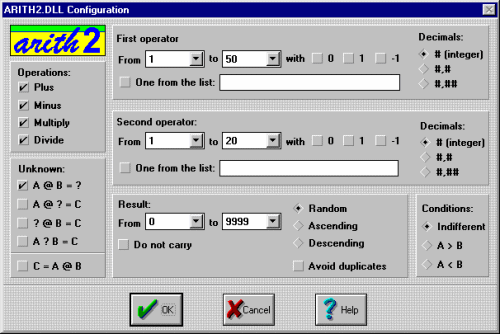
Automatic content generationThere is a file called ARITH2.DLL in the C:\Clic\Act\Demo folder. This is a special programme that acts as an external compliment to Clic, generating mental calculation operations at random based on certain criteria set when making an activity.Open the Clic "demo" and go to the ASS07.ASS activity in the association examples. If you look at the edition window (CTRL+E), you will see something strange: the file ARITEXT.TXT is used as the content for both the A and B grids and if you click on Edit contents, you will see that there is no sign of any mathematical operation. How can the appearance of the activity be so different from what we seem to see in the content files? The secret is in the Activity options window. Note that the Activity automation option is marked and that the file ARITH2.DLL has been selected in the list. In fact Clic does not use the ARITEXT.TXT file, it is only there because a content file is required for each grid in associations. It is the ARITH2 module that governs what appears on the screen. The activity automation modules provide the activities with the contents to be displayed in the cells. At the moment there is only the ARITH2 mental calculation module, but the specifications are published in the Clic help and manual and any programmer that knows C++ and how to make a DLL file (which is not the aim of this course!) could create additional modules that randomly generate the content of other types of activities. The Configuration button, which appears next to the module drop list, calls ARITH2 to show its control screen:
- Which of the four basic arithmetical operations should appear.
- Which of the four elements of an operation (first operator, operation, second operator and result) will be the target. The result is usually the target, e.g. "3 + 4 = ?", but the same operation could be set as: "3 + ? = 7", "? + 4 = 7" or "3 ? 4 = 7". Operations can also be written starting with the result: "7 = 3 + 4".
- The limits of both operators and the result.
- The number of decimals in the result (none, one or two).
- The possibility of setting "do not carry" additions and subtractions i.e. the operation applied digit by digit is never more than 9 or less than 0.
- The ordering of results is useful for setting puzzles such as PUZ05.PUZ in the Clic demo. The Arith2 module tries to generate random operations based on the parameters set as long as they are reasonable. However if it finds non-solvable situations (e.g. a sum with operators between 10 and 20 that give a result less than 5) it finds itself forced to break one of the conditions. To create activities that use the Arith2 module you have to copy the ARITH2.DLL file (which you will find with the Clic demo files) to the corresponding working directory.


|