PuzzlesThe puzzles consist of shuffling a set of information that the user has to put back in order. This set of information could be an image, a sentence taken apart, a fragmented sound recording, a chronological sequence, etc.As you have seen in the examples and in the table above, there are four different modes of puzzles. The most common are the exchange and the double modes, which show all the information that needs to be ordered on the screen. The hole mode restricts movements to the pieces next to the empty cell and is, therefore, the most complicated of all. This is especially so if the content is non-graphic or if there are a lot of pieces. The memory mode is not really a puzzle as here you do not have to reorder but remember what there is in each cell to find the pairs in the minimum number of attempts. Some things to take into account when designing a puzzle:
- If text files are used as the content of a puzzle, Clic will assign one line to each cell. The hard returns in text files are used to separate the contents from one cell from the next. This also applies to associations; always one line per cell.
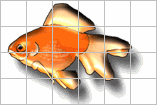
- Background zones with a single colour may appear in some images. When dividing rows and columns, try to make sure that there are never two cells with exactly the same content, as it may visually appear that the puzzle has been solved but the programme detects that there are still two pieces out of place. Here is an example: - When a puzzle is made with an image, we need to work on it beforehand with a graphics editor to give it the appropriate dimensions so that it will fit within the Clic game window. If the image is too large (something that usually happens when it comes from a high resolution scanner), we have two options: get the programme to cut the image, leaving out the area which does not fit on the screen or ask it to compress the image, forcing a change in dimensions that does not always give the desired aspect.
In the "double" mode different initial positions for the grids can be chosen: A to the left of B, B to the left of A, A above B and B above A. In the "memory" types you can choose between duplicating the number of horizontal cells ("AB" mode) or vertical cells ("BA" mode).


|